Unlock Your Personalized Fitness Journey with BeFit

Your AI-powered personal trainer. Get customized workouts for your goals—anytime, anywhere!

Download app Join a community of +50K users!
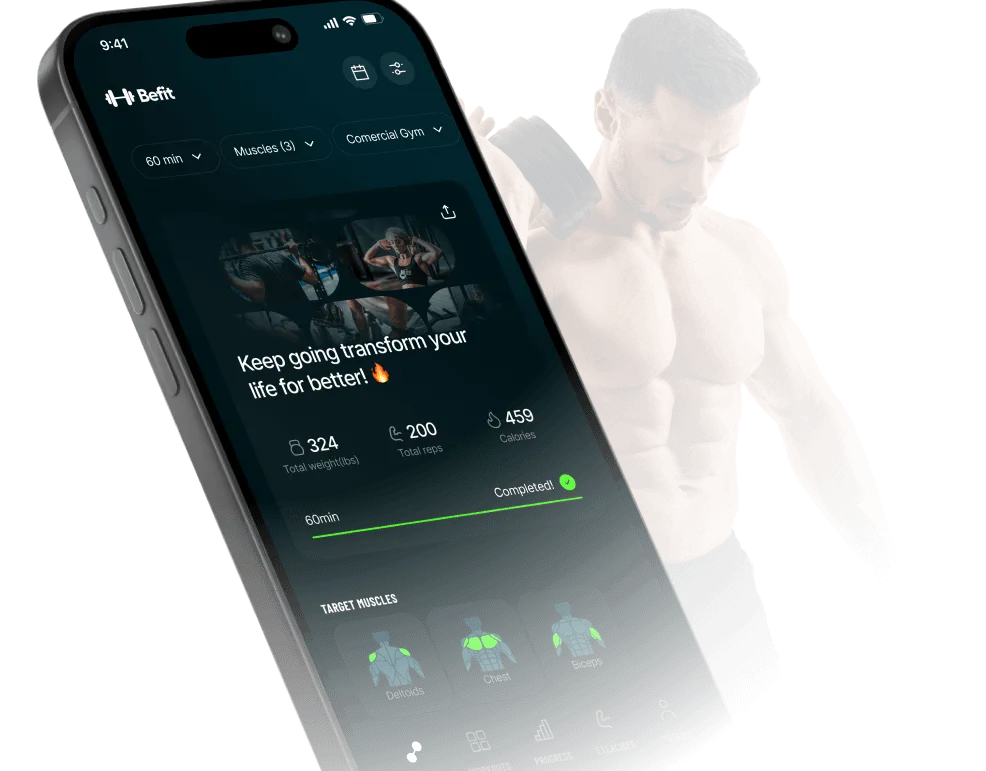
App Befit Mockup

The Best fitness app for your goals: Befit!

fire

Personalized Workout Plans

BeFit creates a unique training plan based on your fitness level, goals, and available equipment.

muscle

Over 300 Exercises

From beginner to advanced, explore a library of over 300 exercises with video guides to ensure proper form and maximize results.

kettlebell

Workout Anywhere

At home or in the gym, BeFit adapts your plan to your environment. No equipment? No problem.

level

Progress Tracking

Stay motivated with real-time progress tracking, detailed stats, and achievements to celebrate your wins.

Your AI-powered personal trainer. Get customized workouts for your goals—anytime, anywhere!

Download app Transform your routine just like thousands have!
Your Fitness, Your Way

FAQ

  • What is Befit?

    Befit is an AI-powered workout app that creates personalized strength training plans for gym or home workouts.

    The app recommends exercises, tracks your workouts, analyzes muscle recovery, and helps you build strength, lose weight, or gain muscle with structured training programs and guided exercise videos.

    Was this article helpful?
  • How Befit app works?

    Befit works by generating a personalized workout plan based on your goals, experience level, and available equipment.

    The app suggests exercises, tracks sets, reps, and weights, and analyzes muscle recovery to recommend the best workout each day, helping users train efficiently and progress over time.

    Was this article helpful?
  • Is Befit a good app?

    Yes. Befit is considered one of the best workout apps for strength training and gym workouts.

    It provides personalized training plans, exercise tracking, muscle recovery analysis, and guided workout videos, helping users improve strength, fitness, and muscle growth with structured routines.

    Was this article helpful?
  • Is the Befit app reliable?

    Yes. The Befit app is a reliable workout app used by over 1 million users worldwide.

    It provides structured strength training programs, guided exercise videos, and AI-powered workout recommendations. Befit workouts and algorithms are developed with input from certified fitness professionals and exercise science experts.

    Was this article helpful?
  • Is Befit free?

    Yes, in a limited way. The free version of the Befit app allows users to download the app, start training, and explore basic features.

    Users can browse workout plans, search for exercises, and get to know the app at no cost. Advanced features such as premium programs, new workouts, unlimited workout tracking, and workout analytics are available with Befit Premium (the Befit app is paid in this case).

    Was this article helpful?
  • Does the Befit app cost money?

    Yes. The Befit app offers a Premium subscription for full access.

    Befit Premium unlocks advanced workout settings, unlimited workout tracking, additional training programs, and enhanced analytics for strength training and progress monitoring.

    Pricing depends on the country. In United Sates, for instance, it typically ranges from $19.99 per month to $69.99 per year at a discounted rate.

    Special offers and coupon codes may occasionally be available to eligible users.

    Was this article helpful?
  • Is Befit good for beginners?

    Yes. The Befit app is good for beginners starting strength training or gym workouts.

    The Befit app creates personalized workout plans based on your goals, fitness level, and available equipment, and includes step-by-step exercise videos that help beginners learn proper form.

    Its simple and intuitive design makes workouts easy to follow, which is one reason many beginners choose Befit.

    Was this article helpful?
  • How does the personalized training plan work?

    Befit creates a training plan just for you, based on your goal, experience level, and how many days per week you want to train.

    Whether you’re aiming to gain muscle or lose fat, the app distributes workouts in a smart, progressive way. The more you train, the more your plan adapts to your pace.

    Each workout is structured to balance muscle groups, avoid overtraining, and help you evolve with purpose, no guesswork needed. Just show up and press play.

    Was this article helpful?
  • Can I use Befit at home or with no gym equipment?

    Yes. Befit adapts to your routine, even if you are training at home.

    When creating your workout plan, you can choose a home workout setup and select the equipment you have available. The app recommends exercises that match your equipment or bodyweight. You can also switch between gym and home settings anytime in the app settings.

    Was this article helpful?
  • Can I swap exercises in the workout?

    Yes, you’re always in control.

    To edit your workout before starting, tap “Edit” on the home screen and use the “Replace” option to swap any exercise.

    Already in a session? Just tap the three dots (⋯) next to the exercise and choose another one that targets the same muscle group.

    Personalize your workout, keep the focus, and train your way.

    Was this article helpful?
  • How do I adjust weight, reps, or rest time?

    The weights shown in Befit are just recommendations based on your profile, but you’re free to change them anytime.

    During your workout, simply tap the numbers to edit weight or reps for each set. Want to change the rest timer? You can do that on the spot too.

    If you prefer to set your own default values, go to the “Edit Workout” screen on the homepage and customize them before starting.

    Was this article helpful?
  • Does the app save my workout history?

    Yes. Your workout history is saved as long as you’re logged into your account.

    Befit tracks your progress: weights, sets, volume, calories, and more. You can review everything in the “Progress” or “Analytics” tab. And the best part: even if you switch devices, your data comes with you, just log in with the same account. Train smart.

    Progress stays with you.

    Was this article helpful?
  • Can I work out more than once a day?

    Yes, You can train many times per day.

    Just keep in mind: if you repeat a workout on the same day using the same training slot, the new session will replace the previous one in your history. If training slots are different, both workouts are counted.
    Your daily streak will limit to 1 per day, while your weekly training goal could be incremented many times in a single day.

    Was this article helpful?
  • How do I turn rest alerts on or off?

    You’re in control of your rest time.

    To manage sound alerts, go to the “Sounds” section under your Profile tab and choose whether you want them on or off.

    During your workout, you can also tap the rest timer and set your preferred default time between sets, quick and easy.

    Rest how you train: on your terms.

    Was this article helpful?
  • What do the “Days of the Week” mean on the home screen?

    Each day of the week represents a custom workout split, like training sheets A, B, C.

    The app follows your sequence, regardless of the day (e.g. Day 1, Day 2…). You can edit your plan anytime in the settings and choose the mode that fits your schedule best.

    Was this article helpful?
  • I changed phones. How do I recover my account?

    It’s Easy! Just download Befit on your new device and log in with the same Google account (for Android) or Apple ID (for iOS) used on the previous phone.

    As long as you were logged in, all your data: workouts, progress, and settings, will be safely restored. New phone, same focus. Your journey stays with you!

    Was this article helpful?
  • How do I cancel, ask for a refund, or restore my Befit subscription?

    All Befit subscriptions are managed directly by the Apple App Store (iOS version) and Google Play (Android version).

    Restore

    On the Befit subscription offer screens, simply tap “Restore Purchases” in the upper corner of the screen.

    Cancel

    User must follow the steps below on the device:

    • Apple App Store (iOS): iPhone Settings > Apple ID > Subscriptions > Befit > Cancel
    • Google Play Store (Android): Play Store > Payments & Subscriptions > Subscriptions > Befit > Cancel

    Refund

    All payment processing and refunds are handled directly by the respective platforms, according to the policies of the Apple App Store and Google Play. To request a refund, follow the instructions provided on the store where the subscription was made.

    This centralized management provides strong transactional security for users on both platforms.

    Was this article helpful?
  • Does Befit work offline?

    Yes, partially.

    You need an internet connection to generate or update your training plan and to sync your progress. But once a workout is loaded, you can complete it offline without any issues.

    No Wi-Fi? No problem. The grind doesn’t stop.

    Was this article helpful?
  • How is the Befit app different from other workout apps?

    The Befit app stands out by generating personalized workout plans with AI based on your goals, experience level, and available equipment.

    The app combines a curated exercise library, a library of workout plans, comprehensive progress analytics, the ability to create custom workouts from scratch, and a simple, intuitive interface for training at the gym or at home. As an extra feature, it also offers fast workouts for users who want to train occasionally.

    Was this article helpful?

Best Fitness Log App

Technology has transformed the way we take care of our bodies. Today, the best fitness log app has become an indispensable ally for those who want to monitor their progress, optimize results, and stay motivated.

With it, you can best app to record workouts, monitor your progress, and adjust your routine based on real data, all in a simple, fast, and intuitive way.

The best fitness log app isn’t just for recording sets and reps. It creates a complete history of your performance, helping you understand your body, identify areas for improvement, and set more realistic goals.

Best app to record workouts: The power of data in your favor

The best fitness log app turns training into a smarter experience. It collects information such as training time, intensity, calorie expenditure, and exercise frequency, generating visual reports that show your progress.

This data helps users understand which workouts are bringing the most results and where there is room for improvement.

The best workout tracker apps makes daily monitoring much more efficient. Instead of relying on memory or paper notes, you have everything organized in one place, with graphs, goals, and personalized alerts.

Organization and clarity in your exercise routine: with the best exercise tracking app

Maintaining a structured routine is essential to achieving consistent results. The best fitness tracking app allows you to plan each week of workouts based on muscle groups, rest days, and performance goals.

This type of organization ensures a balance between effort and recovery, avoiding overexertion and preventing injuries.

The best gym log app helps those who train with weights to monitor load increases, number of sets, and repetitions. This allows progress to be tracked accurately and reduces the risk of stagnation.

Detailed Tracking for Real Results

The best app to log workouts is ideal for those seeking consistent performance. It allows you to record every detail of your workout from warm-up to cool-down creating a complete overview of the session.

With the best workout diary app, you can analyze performance patterns, compare results, and adjust intensity as you progress.

This ability to measure transforms training into something strategic. It’s no longer just about “training,” but about training with purpose, understanding exactly what works for your body.

Technology that Enhances Every Movement

The best fitness log app uses smart features to make your routine easier. It can integrate with wearable devices, such as sports watches, and automatically record metrics such as heart rate and calories burned.

This information is cross-referenced with manual records, creating a more complete analysis.

The best workout tracking apps also send reminders so you don’t miss sessions and suggest adjustments based on your fatigue level. This personalization ensures that your workout remains challenging without compromising recovery.

Continuous Motivation with Smart Feedback

Training alone isn’t always easy, but the best fitness tracking app acts as a digital partner. It offers automatic feedback on your performance, highlighting achievements and suggesting new goals.

Seeing your progress become tangible is one of the greatest sources of motivation.

The best fitness log app also allows you to track weekly and monthly statistics, making it possible to clearly see your progress over time. With this, each session is no longer isolated and becomes part of a cycle of constant growth.

Flexibility for All Types of Training

The best fitness tracking app adapts to any lifestyle. It is useful for those who train in gyms as well as those who prefer to train at home or outdoors.

With the best workout tracking app, you can record different activities weight training, running, cycling, yoga, HIIT, among others while keeping all your information in one place.

This flexibility makes tracking more practical and inclusive, allowing beginners and advanced athletes alike to enjoy the benefits of a smart fitness monitoring tool.

The best workout tracking apps also offer comparisons between periods, allowing users to see how much they have progressed since the beginning. This visualization is one of the keys to staying focused and avoiding dropouts.

Smart Training Starts with Tracking

The best fitness tracking app represents a new era in physical monitoring. It puts control of the training journey in the user’s hands, transforming effort into information and information into progress.

 With the best training log app, you can learn from your results, adjust strategies, and maintain constant motivation.

And for those who want to take tracking to another level, the best gym tracking app and the best workout tracking app offer full integration with equipment and sensors, ensuring accuracy at every step.

Training smart is the surest way to achieve solid goals and the best fitness tracking app is the ideal partner on that journey.

Play Store App Store Open AI Google Cloud