

PDMM Training: How to Use 4 Periodization Phases to Keep Growing
If you train regularly, you may have noticed that results slow down after a few months. This plateau usually [...]


Get your personalized workout plan powered by Befit AI and improve your results!

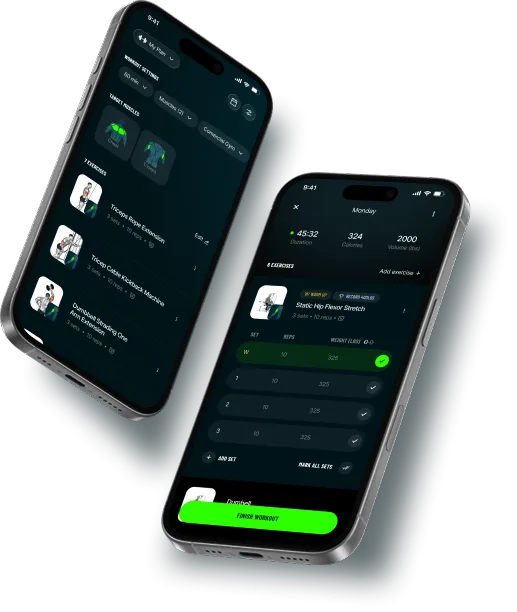

Your goals, experience, and equipment, transformed into a dynamic plan that adapts as you evolve.

Craft your own sessions from scratch, choose exercises, reps, sets, and equipment with absolute control.

Learn proper form, avoid injury, and push your limits with expert-guided video demonstrations.

Real-time stats, performance insights, and achievements built to keep you motivated.

Join thousands of users around the world and experience the future of
personalized training. Download now and start your journey!
“Highly recommend! I’ve been using it for over 6 months now, and as someone who works in the field, I can only praise it.”
 Michael Wilson
“It tracks my daily progress and keeps me consistent week after week. I love it ❤️❤️”
 Sarah Taylor
“Workouts are great and really easy to follow. I’m honestly enjoying the app and already feeling stronger 💪 haha”
 Denis Johnson
“The personalized plan feature is AMAZING!!! It finally feels like I have a program built around me and the way I like to train.”
 Jennifer Collins
“There are tons of ready-made programs and they’re very well organized. Perfect for busy days.”
 William McLoughlin
“I train at home, and Befit really helps me pick the right exercises even without equipment.”
 Elizabeth Davis
Adaptive training, expert guidance, and total flexibility to help every athlete stay consistent and reach their goals.
Skip the guesswork. Get structured, precise guidance that feels like having a personal trainer by your side.
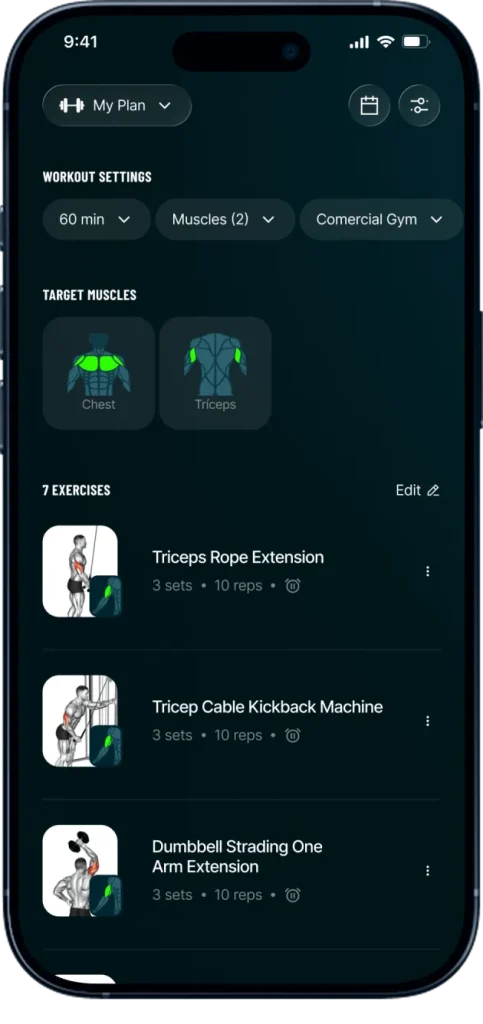



Befit is an AI-powered workout app that creates personalized strength training plans for gym or home workouts.
The app recommends exercises, tracks your workouts, analyzes muscle recovery, and helps you build strength, lose weight, or gain muscle with structured training programs and guided exercise videos.
Befit works by generating a personalized workout plan based on your goals, experience level, and available equipment.
The app suggests exercises, tracks sets, reps, and weights, and analyzes muscle recovery to recommend the best workout each day, helping users train efficiently and progress over time.
Yes. Befit is considered one of the best workout apps for strength training and gym workouts.
It provides personalized training plans, exercise tracking, muscle recovery analysis, and guided workout videos, helping users improve strength, fitness, and muscle growth with structured routines.
Yes. The Befit app is a reliable workout app used by over 1 million users worldwide.
It provides structured strength training programs, guided exercise videos, and AI-powered workout recommendations. Befit workouts and algorithms are developed with input from certified fitness professionals and exercise science experts.
Yes, in a limited way. The free version of the Befit app allows users to download the app, start training, and explore basic features.
Users can browse workout plans, search for exercises, and get to know the app at no cost. Advanced features such as premium programs, new workouts, unlimited workout tracking, and workout analytics are available with Befit Premium (the Befit app is paid in this case).
Yes. The Befit app offers a Premium subscription for full access.
Befit Premium unlocks advanced workout settings, unlimited workout tracking, additional training programs, and enhanced analytics for strength training and progress monitoring.
Pricing depends on the country. In United Sates, for instance, it typically ranges from $19.99 per month to $69.99 per year at a discounted rate.
Special offers and coupon codes may occasionally be available to eligible users.
Yes. The Befit app is good for beginners starting strength training or gym workouts.
The Befit app creates personalized workout plans based on your goals, fitness level, and available equipment, and includes step-by-step exercise videos that help beginners learn proper form.
Its simple and intuitive design makes workouts easy to follow, which is one reason many beginners choose Befit.
Befit creates a training plan just for you, based on your goal, experience level, and how many days per week you want to train.
Whether you’re aiming to gain muscle or lose fat, the app distributes workouts in a smart, progressive way. The more you train, the more your plan adapts to your pace.
Each workout is structured to balance muscle groups, avoid overtraining, and help you evolve with purpose, no guesswork needed. Just show up and press play.
Yes. Befit adapts to your routine, even if you are training at home.
When creating your workout plan, you can choose a home workout setup and select the equipment you have available. The app recommends exercises that match your equipment or bodyweight. You can also switch between gym and home settings anytime in the app settings.
Yes, you’re always in control.
To edit your workout before starting, tap “Edit” on the home screen and use the “Replace” option to swap any exercise.
Already in a session? Just tap the three dots (⋯) next to the exercise and choose another one that targets the same muscle group.
Personalize your workout, keep the focus, and train your way.
The weights shown in Befit are just recommendations based on your profile, but you’re free to change them anytime.
During your workout, simply tap the numbers to edit weight or reps for each set. Want to change the rest timer? You can do that on the spot too.
If you prefer to set your own default values, go to the “Edit Workout” screen on the homepage and customize them before starting.
Yes. Your workout history is saved as long as you’re logged into your account.
Befit tracks your progress: weights, sets, volume, calories, and more. You can review everything in the “Progress” or “Analytics” tab. And the best part: even if you switch devices, your data comes with you, just log in with the same account. Train smart.
Progress stays with you.
Yes, You can train many times per day.
Just keep in mind: if you repeat a workout on the same day using the same training slot, the new session will replace the previous one in your history. If training slots are different, both workouts are counted.
Your daily streak will limit to 1 per day, while your weekly training goal could be incremented many times in a single day.
You’re in control of your rest time.
To manage sound alerts, go to the “Sounds” section under your Profile tab and choose whether you want them on or off.
During your workout, you can also tap the rest timer and set your preferred default time between sets, quick and easy.
Rest how you train: on your terms.
Each day of the week represents a custom workout split, like training sheets A, B, C.
The app follows your sequence, regardless of the day (e.g. Day 1, Day 2…). You can edit your plan anytime in the settings and choose the mode that fits your schedule best.
It’s Easy! Just download Befit on your new device and log in with the same Google account (for Android) or Apple ID (for iOS) used on the previous phone.
As long as you were logged in, all your data: workouts, progress, and settings, will be safely restored. New phone, same focus. Your journey stays with you!
The way you manage your Befit subscription depends on where you made your purchase.
Restoring your subscription
On the Befit subscription offer screens, simply tap “Restore Purchases” in the upper corner of the screen.
Canceling your subscription
The steps to cancel your subscription depend on where you made your purchase:
Canceling your subscription prevents future charges. However, cancellation does not automatically generate a refund for amounts already paid. Refund requests must be handled separately according to the platform where the purchase was made.
Refunds
Payment processing and refunds are handled according to the platform where the purchase was made.
For purchases made through the Apple App Store or Google Play, refund requests must be submitted directly through the respective platform:
For purchases made through Hotmart, refund requests should be submitted through Hotmart:
For purchases made through the website, subscription management and cancellation can be handled directly through the subscription management page:
The centralized payment management provided by each platform helps ensure a secure and reliable transaction experience.
Yes, partially.
You need an internet connection to generate or update your training plan and to sync your progress. But once a workout is loaded, you can complete it offline without any issues.
No Wi-Fi? No problem. The grind doesn’t stop.
The Befit app stands out by generating personalized workout plans with AI based on your goals, experience level, and available equipment.
The app combines a curated exercise library, a library of workout plans, comprehensive progress analytics, the ability to create custom workouts from scratch, and a simple, intuitive interface for training at the gym or at home. As an extra feature, it also offers fast workouts for users who want to train occasionally.


